
Razer V2 Replacement Ear Pads — Black Leather
Razer V2 Replacement Ear Pads — Black Leather for refreshing worn cushions.
$23.67 In stock
SKU RAZER-106-2443-602-91
- Refresh worn cushions with black leather ear pads for razer v2, featuring a smooth leather look and an easy-clean surface.
- Prepare for regular use with gaming headset ear pads for razer v2 that ship as a matching black pair identified by.
- Simplify a replacement project with razer v2 ear pads for long gaming sessions, fitted by stretching each new pad over the cup after checking the mount.
- Keep care straightforward with aftermarket ear pads for razer v2 that have an easy-clean leather-look face and can be wiped with a damp cloth.
Sizes and finishes
- Tiamat 7.1 V2 over-ear cups
- matching Tiamat V2 pair
- wired 7.1 comfort ring
- aftermarket Tiamat pad refresh
About this pair
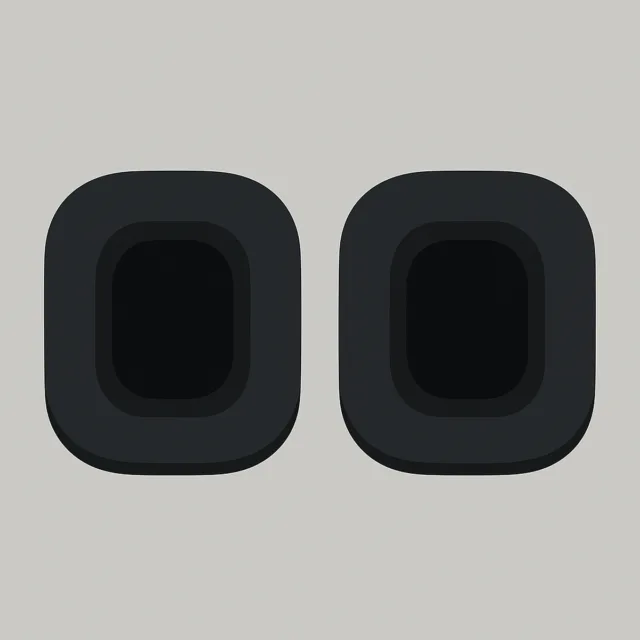
Refresh a worn headset with razer v2 replacement ear pads black . These black leather replacement ear pads give your Razer V2 headset a smooth leather look and an easy-clean surface, making them a practical choice when the original cushions are worn. The shipment is a matching pair identified by.
This listing is for aftermarket replacement pads, not OEM Razer pads. The listing names Razer Tiamat 7.1 V2, so confirm the cup size and mount on your headset before replacing the cushions. The goal is straightforward: remove the worn pads, fit the new black leather-look pair, and return the headset to regular use.
Features
- Refresh worn cushions: Black leather ear pads for razer v2 provide a replacement surface with a smooth leather look, giving the headset a cleaner replacement appearance than worn cushions.
- Keep maintenance simple: Gaming headset ear pads for razer v2 have an easy-clean surface, and a damp cloth is usually enough for the leather-look face.
- Prepare both cups together: The razer v2 ear pads kit ships as a matching pair, with identifying the two black leather-look ear pads.
- Replace the pads on your own headset: Razer v2 ear pads for long gaming sessions can be fitted by peeling each worn cushion and stretching the new pad over the cup, after confirming the mount.
- Choose a defined replacement type: Aftermarket ear pads for razer v2 use protein leather and a black leather-look finish, giving you a clearly specified replacement instead of an unspecified cushion.
Use cases
Use this pair for a Tiamat 7.1 V2 over-ear cups refresh when the existing cushions are worn or flaking. The black surface suits a flaking Tiamat cushion swap, while the smooth finish supports a wipe-clean black analog-digital pads maintenance routine. For a headset used through regular gaming, the matching pair is suited to a wired 7.1 comfort ring replacement project rather than replacing only one side.
These pads are also a practical option for a dual-driver headset leather-look seals replacement on the listed Tiamat 7.1 V2. Confirm that your headset uses the named mount before starting. The listing is for a matching Tiamat V2 pair; do not assume compatibility with other Tiamat models, and note that these are not Thresher or Nari cups.
If you are planning an aftermarket Tiamat pad refresh, the installation process is direct: peel each worn cushion, then stretch the new black leather-look pad over the cup. Check the mount on your Tiamat V2 first. For care, use a damp cloth on the leather-look face and avoid soaking the foam.
Fit and replacement guidance
The listing names Razer Tiamat 7.1 V2, not the first Tiamat. Before ordering, confirm the cup size and mount on your headset. This helps prevent treating the product as a universal Razer replacement or assuming that another Tiamat, Thresher, or Nari cushion will use the same fit.
Once compatibility is confirmed, remove each worn cushion and stretch the replacement over the cup. The pair is supplied in black leather-look material, so both sides can be refreshed at the same time. If the original pads are flaking, remove loose material before fitting the replacement and keep the foam away from soaking moisture during cleaning.
What’s in the box
The shipment is a matching pair of black leather-look ear pads,.
Why this replacement makes sense
Restore the visible headset surface: Worn cushions can make an otherwise usable headset look tired. These replacement ear pads provide a smooth black leather look for the listed Razer V2 application.
Refresh both sides at once: Because the listing ships as a matching pair, you can replace the two ear pads together rather than sourcing a single cushion.
Make routine cleaning easier: The easy-clean surface can be wiped with a damp cloth, while the care guidance keeps the foam from being soaked.
Use a clearly identified part: gives the replacement pair a specific listing reference, while the product description identifies the material as protein leather and the finish as black.
Before you install
Check that your headset is the Razer Tiamat 7.1 V2 named in the listing. Do not assume compatibility with the first Tiamat or with Thresher and Nari cups. Inspect the cup mount, then remove the worn cushion and stretch the replacement pad over the cup. A damp cloth is usually enough for the leather-look face; avoid soaking the foam.
For a matching Tiamat V2 pair and a straightforward cushion refresh, order aftermarket black pads for Razer Tiamat 7.1 V2. This item ships across the US.
Specifications
| Fits | Razer Tiamat 7.1 V2; confirm cup size and mount |
|---|---|
| Color | Black |
| Surface | Smooth leather look with an easy-clean surface |
| Pack | Matching pair; |
| Install | Peel each worn cushion and stretch the new pad over the cup |
Why this pad
- Refresh worn cushions with a smooth black leather look rather than continuing to use the worn original cushions.
- Replace both sides together because the listing ships as a matching pair.
- Keep the leather-look face easier to maintain with a damp-cloth cleaning routine.
$23.67 In stock
What’s in the box
The shipment is a matching pair of black leather-look ear pads,.
Fit and install video
Shipping
Where do you ship? We ship to all 50 US states. How much does shipping cost? Free shipping is available on orders over $79. How long does delivery take? Orders typically arrive within 3-7 business days. Orders ship from 7 strategically located warehouses across the United States.
Payment
You can pay by credit or debit card, cash for NYC pickup, or pay over time with Afterpay when available at checkout. Afterpay availability is confirmed at checkout and may vary by order.
$23.67 In stock
Warranty
12-month fit warranty against premature peeling or collapsed foam. Unused pads may be returned within 30 days under your state’s consumer rules.
Returns
Start a return from the order confirmation we email you. We cover return labels on manufacturing defects. Cosmetic wear after use is not covered.
$23.67 In stock
FAQ
Do these fit Tiamat 7.1 V2, not the first Tiamat?
The listing names Razer Tiamat 7.1 V2. Confirm cup size; do not assume other Tiamat or Thresher pads.
How do I replace Tiamat V2 ear pads?
Peel each worn cushion and stretch the new black leather-look pad over the cup. Confirm the mount on your Tiamat V2.
Can I wipe the leather-look face?
Yes. A damp cloth is usually enough. Avoid soaking the foam.
Is a pair?
The listing ships as a matching pair of black leather-look ear pads as.
OEM Razer Tiamat ovals?
These are aftermarket replacement pads unless the listing says OEM.
Where can I buy Tiamat 7.1 V2 black leather-look pads as a pair?
This listing is for a matching pair of black leather-look replacement ear pads for the Razer Tiamat 7.1 V2, identified as.
Other pads in this material

Contact
Buds Need Parts
123 W 45th St, New York, NY 10036
Mon–Fri 9:00–18:00 ET